
Build Karapathy's NanoCHAT from scratch Free Using AMD Credits - Part-3
Part-3 of Building NanoCHAT from scratch

Welcome back to the Part-3, where we will be finally pre-training on the droplet. Little teaser how your screen looks like after successful pre-training.
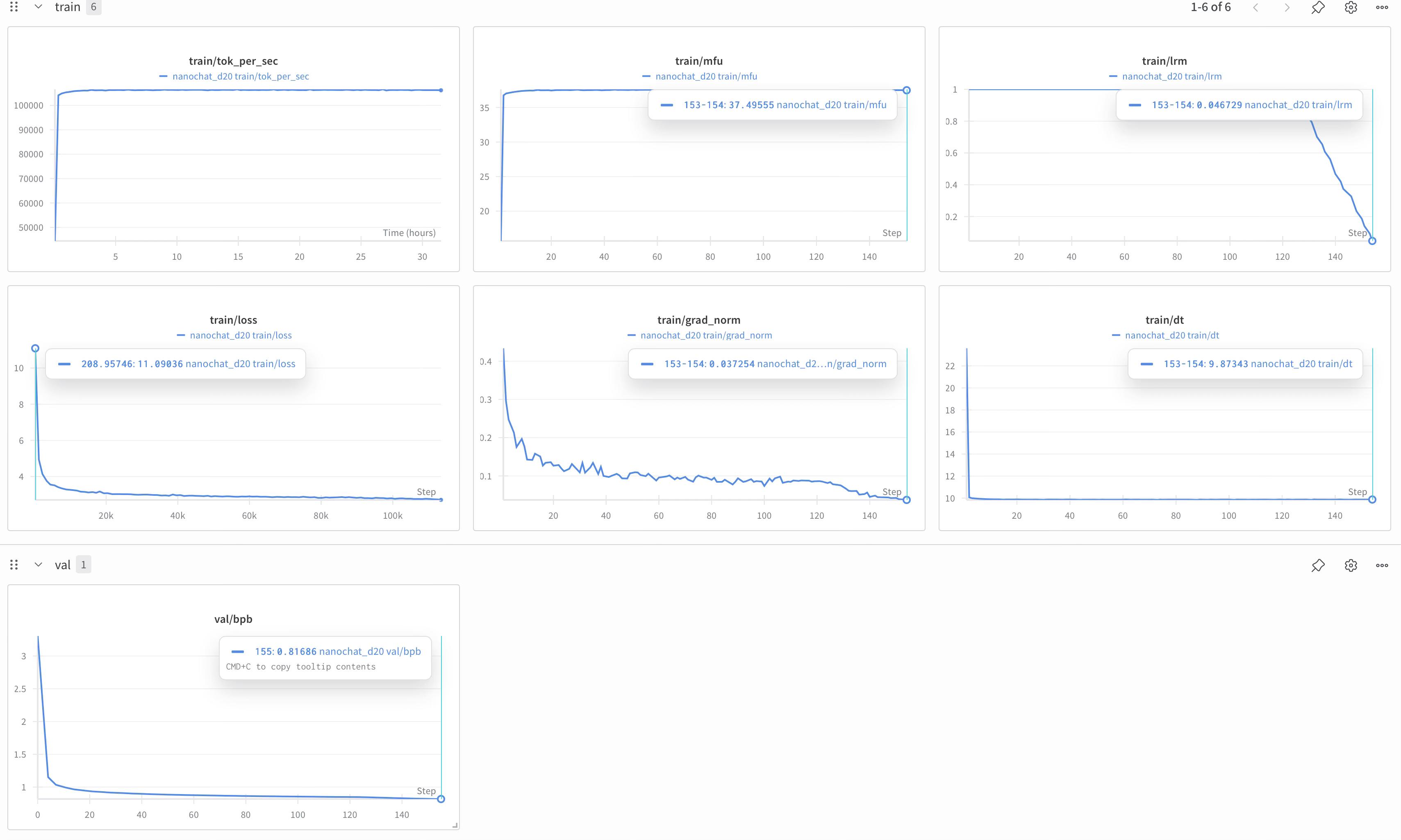
We reached train/val bits per byte (bpb) of 0.81686, and the CORE metric goes up to 0.22. For comparison, the eval bundle contains the GPT-2 model CORE scores. In particular, CORE of 0.22 is a little bit more than GPT-2 large (at 0.21) but a little bit less than GPT-2 xl (i.e. “the” GPT-2, at 0.26). Reference: Karpathy’s blog
For part-1:
For part-2:
To kick things off right away, hop on to this website: amd.digitalocean.com, fell free to follow the blog post or else if you’re more of visual learner you can the video below where I recorded the key parts of pre-training.
Watch the next video after following the instructions given below, as there is an issue https://karpathy-public.s3.us-west-2.amazonaws.com/eval_bundle.zip observed after recording the video.
Commands used in the run pod:
sudo apt updateScreen lets you detach and reattach to terminal sessions, keeping your model training running uninterrupted on Droplets or RunPod after you disconnect.
sudo apt install screenWeights & Biases (wandb) is a platform designed to track, visualize, and manage machine learning experiments from training on a local machine to large-scale cloud runs. WANDB_RUN lets you pre-name your Weights & Biases tracking run from the terminal, so you can easily identify and monitor.
wandb loginexport WANDB_RUN=”nanochat_d20_experiment”Starting the screen session:
screen -S nanochat_d20Clone the project:
git clone https://github.com/karpathy/nanochat.git
cd nanochat
Install uv, create a new virtual environment in .venv, get all the dependencies, and activate the environment so that when we type python we’re using the virtual env python, not the system python:
Usually uv sync installs all dependencies needed for us, and speedrun.sh will is sequence of bash commands that completes the whole training with single command “bash speedrun.sh” but uv installs the “CUDA” based PyTorch that will not work in AMD software, one can try changing the “pyproject.toml” to ROCm PyTorch but failed due to cross function dependencies.
As Tokenizer training is CPU heavy, it can be trained in “venv” after the tokenizer training deactivate the environment and leverage the ROCm PyTorch docker image.
# install uv (if not already installed)

command -v uv &> /dev/null || curl -LsSf https://astral.sh/uv/install.sh | sh

# create a .venv local virtual environment (if it doesn’t exist)

[ -d “.venv” ] || uv venv

# install the repo dependencies

uv sync

# activate venv so that `python` uses the project’s venv instead of system python

source .venv/bin/activate
Next, we need to install Rust/Cargo so that we can compile our custom Rust tokenizer. Training rust based tokenizer is the challenging part of this project as it has many dependencies.
# Install Rust / Cargo
curl --proto ‘=https’ --tlsv1.2 -sSf https://sh.rustup.rs | sh -s -- -y
source “$HOME/.cargo/env”
# Build the rustbpe Tokenizer
uv run maturin develop --release --manifest-path rustbpe/Cargo.toml
Next we need the pretraining data so that we can 1) train the tokenizer and 2) pretrain the model. The pretraining data is just the text of a lot of webpages, and for this part we will use the FineWeb-EDU dataset. More details on Reference: Karpathy’s blog.
python -m nanochat.dataset -n 240python -m scripts.tok_train --max_chars=2000000000
python -m scripts.tok_evalsudo apt install unzipAs discussed in GitHub issue, the link curl -L -o eval_bundle.zip https://karpathy-public.s3.us-west-2.amazonaws.com/eval_bundle.zip doesn’t seam to work, we will replace with https://github.com/user-attachments/files/24214174/eval_bundle.zip, provided in issue comments
curl -L -o eval_bundle.zip https://github.com/user-attachments/files/24214174/eval_bundle.zip
curl -L -o eval_bundle.zip
unzip -q eval_bundle.zip
rm eval_bundle.zip
mv eval_bundle “$HOME/.cache/nanochat”
As discussed above, deactivate the venv, carry out with pre-training.
deactivateWe can now kick off pretraining! This is the most computationally heavy part, where we are training the LLM to compress internet web text by predicting the next token in the sequence, and where the LLM gains a lot of knowledge about the world:
torchrun --standalone --nproc_per_node=1 -m scripts.base_train -- --depth=20 --run=$WANDB_RUN --save_every=1000 --num_iterations=10700 --device_batch_size=64 --total_batch_size=1048576How did we achieve at each number and what it means:
torchrun --standalone --nproc_per_node=1 -m scripts.base_train -- --depth=20 → this is for default run provided in karpathy blog, where the depth means at number of self attention + MLP blocks increasing it increases the size of nano chat model, with depth = 20 the model size comes down to ~ 561M.
--run=$WANDB_RUN → To use weights and biases for performance view during training
--save_every=1000 → Every 1000 epochs the weights will be saved
--num_iterations=10700 → As batch size is doubled, the num_iterations are halved from initial 21400
--device_batch_size=64 → The batch size is doubled, as size of vram is more than double the H100, and during my trail run the approximate peak memory came out to be: 145 GB
The file base_loss.py runs these. The prompts are:
prompts = [
    “The capital of France is”,
    “The chemical symbol of gold is”,
    “If yesterday was Friday, then tomorrow will be”,
    “The opposite of hot is”,
    “The planets of the solar system are:”,
    “My favorite color is”,
    “If 5*x + 3 = 13, then x is”,
]
And the completed text is:
The capital of France is Paris. It is the largest city in France and the second largest city in Europe
The chemical symbol of gold is Au. The chemical symbol of silver is Ag. The chemical symbol of copper is
If yesterday was Friday, then tomorrow will be Saturday. If yesterday was Monday, then tomorrow will be Monday. If yesterday was
The opposite of hot is cold. The opposite of hot is cold. The opposite of hot is cold.
The planets of the solar system are: Mercury, Venus, Earth, Mars, Jupiter, Saturn, Uranus, Neptune,
My favorite color is red. It is the color of the sun, the color of the sky,
If 5*x + 3 = 13, then x is a positive integer.
Results of pre-training :
Base model loss :
timestamp: 2025-12-14 23:52:17
train bpb: 0.8162
val bpb: 0.8135
Base model training :
timestamp: 2025-12-14 22:45:05
run: nanochat_d20
device_type:
depth: 20
max_seq_len: 2048
num_iterations: -1
target_flops: -1.0000
target_param_data_ratio: 20
device_batch_size: 64
total_batch_size: 1,048,576
embedding_lr: 0.4000
unembedding_lr: 0.0080
weight_decay: 0.0000
matrix_lr: 0.0400
grad_clip: 1.0000
warmup_ratio: 0.0000
warmdown_ratio: 0.2000
final_lr_frac: 0.0000
resume_from_step: -1
eval_every: 250
eval_tokens: 62,914,560
core_metric_every: 2000
core_metric_max_per_task: 500
sample_every: 2000
save_every: 1000
model_tag:
Number of parameters: 560,988,160
Number of FLOPs per token: 3.491758e+09
Calculated number of iterations: 10,700
Number of training tokens: 11,219,763,200
Tokens : Params ratio: 20.0000
DDP world size: 1
warmup_ratio: 0.0000
warmdown_ratio: 0.2000
final_lr_frac: 0.0000
Minimum validation bpb: 0.8169
Final validation bpb: 0.8169
CORE metric estimate: 0.2100
MFU %: 37.51%
Total training flops: 3.917670e+19
Total training time: 1758.84m
Peak memory usage: 145766.77MiB
Base model evaluation :
timestamp: 2025-12-15 00:17:50
Model: base_model (step 10700)
CORE metric: 0.2036
hellaswag_zeroshot: 0.2555
jeopardy: 0.0874
bigbench_qa_wikidata: 0.5157
arc_easy: 0.5253
arc_challenge: 0.1069
copa: 0.2200
commonsense_qa: 0.1308
piqa: 0.3765
openbook_qa: 0.0987
lambada_openai: 0.3852
hellaswag: 0.2591
winograd: 0.2821
winogrande: 0.0355
bigbench_dyck_languages: 0.0890
agi_eval_lsat_ar: 0.1141
bigbench_cs_algorithms: 0.4030
bigbench_operators: 0.1905
bigbench_repeat_copy_logic: 0.0000
squad: 0.2085
coqa: 0.2078
boolq: -0.1902
bigbench_language_identification: 0.1770
What’s Next? Pre-training of nanochat
🔄 From Raw Text to Structured Conversation: Watch the model transition from understanding general documents to mastering multi-turn dialogue format. See how it learns new special tokens (<|user_start|>, <|assistant_start|>, etc.) that transform its behavior from document completion to conversational response.
🔄 From Raw Text to Structured Conversation: Watch the model transition from understanding general documents to mastering multi-turn dialogue format. See how it learns new special tokens (<|user_start|>, <|assistant_start|>, etc.) that transform its behavior from document completion to conversational response.
🔧 Special Token Embeddings Evolution: Visualize how the model’s representation space adapts to new special tokens – watching conversational tokens develop distinct embeddings from regular vocabulary.